Post
Two Claude accounts, one session
I was burning Claude session quota too fast, so I added another account. claude-swap auto-switches at 90% while the session keeps running.
I was burning through Claude session quota way too fast. So I registered another account.
Managing them with claude-swap (the command is cswap) is brilliant. It watches usage and auto-swaps the account in-flight when you hit 90%. Setup was extremely easy, and once it’s watching I don’t have to do anything; I don’t really notice anything during the session.
If you want the same setup:
pipx install claude-swap- Log into Claude Code with your first account and run
cswap add. - Don’t log out. From inside Claude Code, run
/loginto switch to the other account, thencswap addagain. (Logging out first can revoke the refresh token stored for the account you’re leaving.)
Then start watching. cswap has to stay running in a terminal in the foreground. It does not run in the background, and the accounts do not swap unless cswap is running:
cswap auto
That polls your usage and switches to the account with the most quota left when the active one’s 5-hour or 7-day window hits 90%, while the session keeps running.
These days I skip cswap auto and just run cswap for the dashboard instead. Pick “Watch accounts” in there and it does the same thing, with the usage bars on screen while it works. That’s the dashboard in the screenshot below.
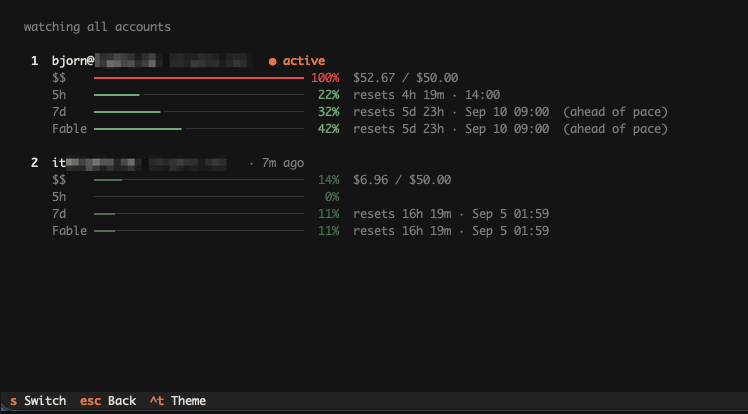
The cswap dashboard: live usage for both accounts, and auto-switching.
There is one thing you do notice. When it switches, the new account has a cold cache, so the next request has to feed the entire context in again. Session usage starts with a small bump: I’ve seen 11–13% of the 5-hour quota go on the first request after a swap. How big depends entirely on the size of your context.