Post
One style guide for everything Claude Code writes
I wanted everything Claude Code writes for developers to follow the Google developer documentation style guide. A forked skill, a few adaptations, and a local snapshot of all 70 guide pages got me there.
Claude Code writes a lot of prose on my behalf these days: README files, code comments, commit messages, review feedback, changelogs. Each piece might be fine on its own, but side by side they drift. One document opens with a sales pitch, the next buries the point in the third paragraph, and a review comment hedges where it should just say the thing.
I wanted it all to be to the point, clear and unambiguous, and I wanted all of it to follow a standard for well written developer documentation. The Google developer documentation style guide is the standard I would pick for humans, so it is the standard I picked for the agent.
Where it came from
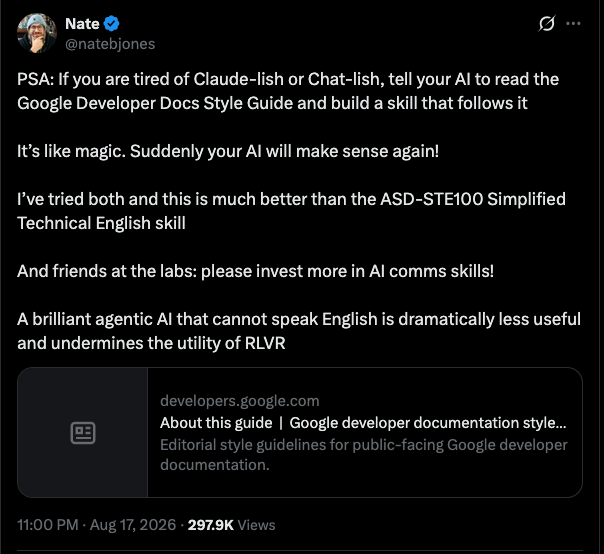
On August 17, 2026, Nate B. Jones suggested that agents should read the Google style guide and turn it into a reusable skill. Daniel Green did exactly that the same day and published nbj-write-clearly: a compact skill that operationalizes the guide’s core principles. It leads with the reader’s answer, names the actor, puts conditions before instructions, and routes specialized questions to the relevant official page instead of reproducing the whole guide. Green attributes it properly too, since Google licenses the guide’s content under CC BY 4.0.
I forked it, because I wanted it to do a bit more than it was built for.
Skill or output style?
Claude Code has two mechanisms that sound right for “always write like this”: output styles and skills.
Output styles modify the main conversation’s system prompt, and only the main conversation’s. Subagents run their own system prompts, so an output style doesn’t reach them. The one exception is a forked session, which inherits the parent’s full system prompt. My whole review setup, with code review, security review, and plan review, runs on subagents (none of them are forks), and their output is exactly the prose I wanted covered. There is no outputStyle field in the subagent frontmatter either, so you can’t assign a style per agent the way you can with model. That ruled output styles out.
Claude Code recently gained a built-in “Concise” output style, selectable under Output style in /config. It solves a different problem: it trims the preamble and narration in Claude’s conversational replies. It carries no style guide for the artifacts Claude writes, like docs, commits and review comments, and as an output style it still doesn’t reach subagents. Use both if you like. They don’t overlap.
A skill loads on demand, which leaves a gap of its own: a one-line code comment does not look like documentation work, so the skill will not load for it. The fix is a layered setup. About fifteen lines of the highest-frequency rules live in my global CLAUDE.md, which reaches every session and every custom subagent. The skill carries the full guidance and loads when the work is actually about writing. There is a third layer available too: a subagent’s frontmatter accepts a skills field that preloads skills into that agent, so the reviewer agents can carry the full skill instead of just the CLAUDE.md baseline.
What I changed in the fork
The upstream skill triggers on documentation artifacts: docs, procedures, release notes, UI copy. I broadened the trigger to all developer-facing prose, so it also covers code review feedback, code comments and docstrings, commit messages, merge request descriptions, and changelog entries. The rules are the same. Only the artifact list grew.
The bigger change was taking the style guide offline.
A local copy of all 70 pages
The upstream skill answers specialized questions, such as word choice, punctuation, and placeholder formatting, by fetching the relevant page from developers.google.com. That works, but Claude Code’s web fetch runs pages through a small summarizer model, which is lossy in exactly the wrong place: when you consult a style guide, you want the rule’s precise wording, not the gist of it. Live fetches also need network access and a permission prompt every time.
So the fork vendors all 70 referenced pages as Markdown files, generated by a Bun script:
bun run sync-official
Each snapshot carries its source URL, snapshot date, and license header. The index tells the agent to read the local file first and to treat the live page as a fallback. A lookup is now an exact, offline file read. When I asked a fresh session whether an em dash takes surrounding spaces, it answered from references/official/dashes.md and cited the line, without touching the network.
Converting Google’s HTML to Markdown was fiddlier than I expected. Literal markup examples sit in bare <pre> blocks that the converter happily rendered as real headings, and code fences do not survive inside Markdown tables. My own review setup caught the corruption before it shipped, which felt pleasantly circular: the skill that polices my writing got debugged by the reviewers it will be policing.
The guide only changes a few times a year, so staleness is a re-run of the sync script and a look at the diff.
What it’s good for
The consistency is nice, but the real win is the clear and concise language. You don’t need (or want) technical documentation to be fancy novels that challenge your language skills. Documents open with the answer. Review comments state the problem instead of circling it. Commit messages describe what changed. The skill drafts, revises, and audits. The audit mode reports problems without rewriting, which is useful when you want to keep your own voice.
It deliberately stays away from marketing, legal, academic, and personal writing. A style guide for technical documentation makes those worse, not better.
Using it
If you want the broadened fork, clone it and link it into your skills directory. The upstream README copies the directory instead. I prefer a symlink because git pull then updates the installed skill in one step.
git clone https://github.com/bjornjohansen/nbj-write-clearly.git
mkdir -p ~/.claude/skills
ln -s "$PWD/nbj-write-clearly/.agents/skills/nbj-write-clearly" ~/.claude/skills/
In a new Claude Code session, invoke it with /nbj-write-clearly, or just ask for documentation work and let it trigger itself. If you want the always-on layer as well, put a short section of the core rules in your CLAUDE.md: second person, active voice, conditions before instructions, no filler. Then point it at the skill for the heavy lifting.
The fork lives at github.com/bjornjohansen/nbj-write-clearly, MIT licensed like the original, with Google’s content under its own licenses.